AutoMarker AI by HoloMotion
AI marker labeling for your C3D motion-capture data
Keep your capture equipment. Bring static references and gait trials into an online workflow for marker naming, processing and result review.
Institutional accounts. Contact your administrator or HoloMotion to arrange access.
中文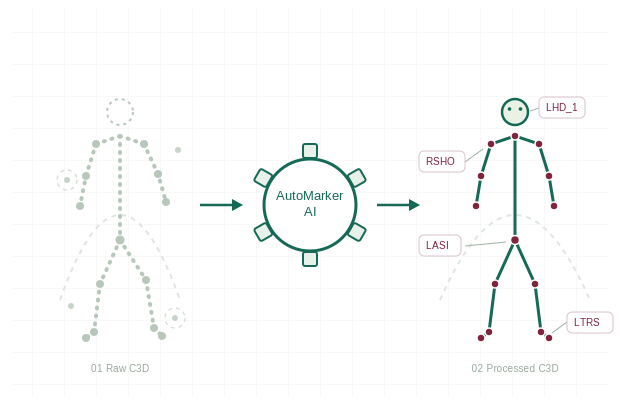
What is AutoMarker AI?
AutoMarker AI is HoloMotion's online service for automatic marker naming and result review of marker-based optical motion-capture C3D files. The current service supports gait trials with a static reference and a defined 79-label marker set. It complements existing capture equipment and is separate from HoloMotion's video-based markerless analysis.
For teams that already collect optical motion-capture data
- Biomechanics and gait laboratories
- Organize static references and repeated gait trials, then review marker names and trajectories before downstream analysis.
- University and sports-science teams
- Use one preparation guide across researchers and students, with a shared marker-label reference for repeatable data handover.
- Clinical research and rehabilitation teams
- Prepare permitted research data for a traceable review workflow. Clinicians and researchers retain responsibility for interpretation.
Capture, process, review, continue your analysis
Prepare
Export C3D from your existing workflow. Match the marker set and package one static reference with 1-10 gait trials per subject.
Submit
An authorized institutional administrator uploads the archive. Follow validation, storage synchronization and processing status.
Review
Inspect original and processed C3D data and each file's result. Check label identity, trajectories and any data gaps.
Continue
Use reviewed results in your lab's analysis workflow after confirming the required labels, coordinates and downstream import.
Check the input before your first upload
These are the current public service limits. Matching a file format or point count alone does not establish marker-set compatibility.
| Input | Current requirement |
|---|---|
| Motion | Gait / walking trials |
| Marker set | Defined 79-label marker set, across 18 configured segments |
| Static reference | Exactly one non-empty, parseable C3D in Static/Raw per subject |
| Dynamic trials | 1-10 gait C3D files in Gait/Raw per subject |
| Archive | ZIP, TAR or TAR.GZ; maximum 500 MiB (524,288,000 bytes) |
| Each C3D | Maximum 5 MiB (5,242,880 bytes), 1,000 frames, 100 points per frame |
| Account | Institutional access; uploads by an authorized administrator |
One subject, one static reference, one set of gait trials
Subject01/
├── Static/
│   └── Raw/
│       └── standing.c3d
└── Gait/
    └── Raw/
        ├── walk01.c3d
        └── walk02.c3d
Subject and optional outer-directory names use ASCII letters and digits. Keep Static, Gait and Raw as the fixed directory names. The optional outer directory is limited to one level.
Current data requirements and marker-label indexC3D export is the starting point for compatibility
For a lab using Vicon, Qualisys, OptiTrack or another optical system, the decision starts with its exported C3D, marker definitions and trial structure. AutoMarker AI currently publishes a specific marker set and gait workflow, rather than blanket support for every vendor configuration. Check a permitted sample with the team before routine use.
Choose the workflow that matches your input
| AutoMarker AI | HoloMotion markerless analysis | |
|---|---|---|
| Starting data | Optical marker trajectories in C3D | Camera or video-based movement data |
| Task | Marker naming, processing and C3D result review | Movement capture and functional assessment |
| Equipment | Continue using your existing optical capture setup | Explore HoloMotion capture and assessment options |
Marker labeling, gap filling and access: practical questions
- Is automatic marker labeling the same as gap filling?
- Marker labeling assigns identities to recorded trajectories. Gap filling estimates missing trajectory samples. AutoMarker AI's current public service documents automatic C3D marker naming and result review. For missing or occluded markers, confirm the supported handling and review the output; the page does not promise recovery of every gap.
- Can I use my Vicon, Qualisys or OptiTrack data?
- Start with the exported C3D file, not the camera brand alone. Check the current 79-label marker definitions, gait motion, static reference, directory structure and file limits. Compatibility with other marker layouts or vendor-specific pipelines needs a sample review.
- Can I register and upload immediately?
- The service currently uses institutional accounts and does not offer public self-registration. Contact your institutional administrator or HoloMotion to confirm access. Uploading requires the appropriate administrator role.
- Does it support running, jumping or arbitrary motions?
- The current published scope is Gait, using a static reference and walking trials. Discuss other motions and marker layouts with HoloMotion before preparing a routine workflow.
- Does a 100-point input limit mean a 100-marker model?
- No. One hundred points per frame is an input-resource limit. The current marker reference contains 79 standard labels across 18 configured segments. Upload acceptance alone does not prove model compatibility or complete output.
- How should I assess processing quality?
- Review each file's status, compare original and processed C3D, and inspect label identities, trajectories and missing sections. Confirm downstream import in your own analysis tool. Upload success is separate from processing completion and expert acceptance.
- How long does processing take and what does it cost?
- The public service does not promise a fixed processing time or publish a universal price. Discuss sample size, file volume, marker compatibility and institutional access with HoloMotion. These define a useful evaluation before agreeing a service scope.
- How is access to uploaded data managed?
- The public service describes organization- and role-based access. Storage duration, deletion and permitted reuse follow the service terms and your institution's agreement. Confirm data permissions before uploading identifiable research or patient data.
Bring one representative C3D dataset
Tell us your capture system, marker layout, trial types and processing volume. We can start with an access discussion and compatibility review for a permitted static-and-gait sample.